Overview |
 Comments (0) |
 Ratings (0) |
 Download |

|
||||||||||||||||||||
|
Search
Software
Advertisements!
Free-downloads
|
Options for VIMeteo
Advertisement
VIMeteo
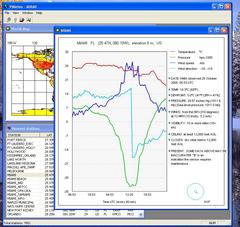
 - More then 7000 weather stations works day and night all around the World.
- Now you can get a real-time meteo data from all of them. - You can get also a history of meteo data for the past 1 - 60 hours. - Care about your family, make a business trip, land a plane, sail anywhere safely! How to use it: - double click on a worldmap for a list of a nearest stations; - double click (or press Enter) in a list at a station you are interesting for; - you will get a past 6 hours of meteodata for that station; - then you will getting the new meteodata every 10 - 60 minutes (depending of station) automatically; - use "Mark all stations" button for show all stations on the world map as a red points; - use "Show all stations table" button for show a list of all stations; - use "Find station" button for finding a station by a part of the name or by the ICAO code; Parameters dialog: - select a meteo data to show on a diagramm: temperature, pressure, wind speed, wind direction; - set a USA style (Fahrenheit etc) or European style (Celsius etc); - change the past time to show in a range of 1 to 60 hours; - change the distance for looking around the double-clicked point on a world map (in minutes, 1 minute = 1 naut. mile); - set write or not a meteodata for the current station to a txt file; Tips: - the changes you have made in a meteo part of Parameters dialog will be shown for the next opened station; - in a list of stations use keys: "Home" for go to top, "End" for go to bottom, "Page Up", "Page Down" for scrolling, "Enter" for select a station; - quickly select one of the last stations in menu "File"; - click a header of column in a stations list for sortinig a list by that column; Advertisement
|
|||||||||||||||||||